When is Registration & Understanding Registration Flags
When is Registration for Spring 2027?
Registration Group Dates
- According to their group assignment, students may register using Self-Service through the MC Portal or process their Schedule Request Form in person at the Admissions and Records Office located on the 2nd floor of the Lesher Student Services Center on the Merced Campus, or at the Student Services Building on the Los Banos Campus.
- If prerequisite courses are not met, a counselor’s approval is required prior to registration.
- If a hold is on your record due to academic probation or past due fees, you must see a counselor and/or pay the outstanding fees prior to registration.
- The Dean of Student Services must approve 20 units or more for the regular 16 week session or 16 units or more for the summer session.
*Priority registration starts the 9th week of each primary term
Current/Former homeless youth qualify for priority registration. Here’s how to qualify:
Step 1: Complete Enrollment Steps:
- Submit CCCApply Application
- Complete orientation
- Create an Educational Plan with a counselor
- Submit FAFSA
Step 2: Verify Independent Student Status
After initial FAFSA review and if a student is eligible, Financial Aid will contact the student requesting verification. The student must submit an official letter from any of the following documenting their status:
- a high school or school district homeless liaison,
- the director of an emergency shelter or transitional housing program, or
- the director of a runaway or homeless youth basic center or transitional living program.
“Homeless youth” means at any time during the 24 months immediately preceding the application for admission. “Former homeless youth” means a student under 25 years of age, who has been verified.
Priority Registration will be assigned for 6 years or until the age of 25, whichever comes first, upon verification of homeless status.
Step 3: Submit for Eligibility Review
Send the homeless verification letter to the Financial Aid Department at [email protected]
Students who have a child under 18 years of age who will receive more than half of their support from that student may qualify for Group 1 Priority Registration (AB 2881:Bergman).
To be considered for eligibility, you must submit a Student Parent Questionnaire. Information and deadlines about this questionnaire will be sent to your Merced College email address in February and September.
Spring 2027 Priority Group Dates
Students who are qualifying Foster Youth or former Foster Youth(1), or Homeless Youth(2) at Merced College.
OR
Students who are qualifying Veterans, or students who are receiving services from EOPS, DSPS, CalWORKs or Tribal TANF, or eligible student parents(3) or justice-involved students(4), and who:
- have completed orientation and developed a student education plan (abbreviated education plan if less than 15 units completed and comprehensive education plan if 15 units or more completed) at Merced College;
- have completed less than 100 degree-applicable units at Merced College;
- do not have two or more continuous semesters of probation at Merced College immediately prior to semester enrolling.
Footnotes:
(1) “Foster youth and former foster youth” means a person in California whose dependency was established or continued by the court on or after the youth’s 16th birthday and who is no older than 25 years of age at the commencement of the academic year.
(2) “Homeless youth” means a student under 25 years of age, who has been verified at any time during the 24 months immediately preceding the receipt of his or her application for admission by a postsecondary educational institution that is a qualifying institution pursuant to Section 69432.7, as a homeless child or youth, as defined in subsection (2) of Section 725 of the federal McKinney-Vento Homeless Assistance Act (42 U.S.C. Sec. 11434a(2)). A student who is verified as a homeless youth within 24-months prior to their admission application shall retain that status for a period of six years from the date of admission to the postsecondary educational institution or until the age of 25, whichever comes first.
(3) AB 2881 (Berman) Public postsecondary education: students with dependent children states Merced College will offer priority registration to eligible students who have a child under 18 years of age who will receive more than half their support from that student.
(4) Justice-involved students receiving services from a program funded by Rising Scholars Network funds. T5 §58108.
Athletes, International Students, students with a 3.5 GPA or better and all continuing students who have completed or are in-progress of completing 30-75 units at Merced College prior to semester enrolling and who:
- have completed orientation and developed a student comprehensive education plan at Merced College;
- have completed less than 100 degree applicable units at Merced College;
- do not have 2 or more continuous semesters of probation at Merced College immediately prior to semester enrolling.
New students, including graduating high school seniors, who:
- have completed orientation and developed a student education plan (abbreviated education plan if less than 15 units completed and comprehensive education plan if 15 units or more completed) at Merced College.
Returning students and all other continuing students at Merced College prior to semester enrolling and who:
- have completed orientation and developed a student education plan (abbreviated education plan if less than 15 units completed and comprehensive education plan if 15 units or more completed) at Merced College
- have completed less than 100 degree applicable units at Merced College
- do not have 2 or more continuous semesters of probation at Merced College immediately prior to semester enrolling
All other students (i.e. Special Admit K-12 students, students who have completed 100 or more degree applicable units, academic enrichment, students not completing orientation and education plans, etc.).
Understanding Registration Flags
When registering for classes, you might encounter different flags that can impact your ability to enroll. Below is a guide to help you understand what each flag means and what steps you can take to resolve them. Click on a flag to learn more.
Another user, such as an advisor or staff member, is accessing your account. Please try again later or contact Admissions at [email protected].

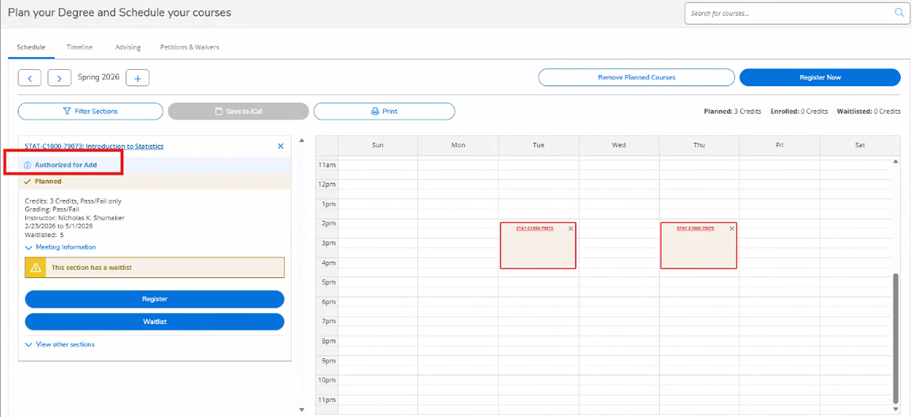
This course requires Instructor approval before you can register. Contact the instructor for authorization.

Once the add authorization has been issued, you still need to register for the course. The Authorized to Add banner will display for the course in student planning. Click the blue Register or Register Now button to enroll.
This flag appears when you need to apply for admission before registering for courses.
Apply online to get started. Apply for the term(s) you intend to enroll in. We have two application terms, spring and summer/fall. The summer/fall application allows you to enroll in either or both terms.

This course is full. You can join the waitlist or look for other available sections.

If you have previously taken a course and dropped it this message will come up; however, it does not block you from registering.

Your selected course is saved in your plan, but you are not officially registered until you select a section and register.

This means you have courses planned but not specific sections. You need to select sections before you can register. If you need help selecting sections, visit the Welcome Center or meet with an academic advisor.

A completed K12 Permit is required to register. Visit our dual enrollment registration page for more information.
K-12 Students – Dual Enrollment ▸

You have reached the maximum units allowable for the term. You must petition to enroll in overload units. Submit an Excess Unit Request, located on our form page, if you want to enroll in additional units for the term.

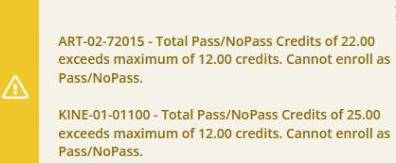
Students are only allowed 12 units to be earned on a Pass/No Pass. You have exceeded the number of allowable units. If you successfully passed a course you put on Pass/No Pass, you can submit a Removal of Pass/No Pass to Letter Grade form located on our forms page.
If you are unsure whether the change to a letter grade will positively impact your GPA, schedule an appointment to see your counselor or email [email protected].
You have an unpaid balance that must be resolved before registering. Visit Student Fees to clear your hold.

You must complete a required course before enrolling in this class. Check course prerequisites in the class schedule or speak with an academic advisor. If you have met the prerequisite for the course elsewhere, you will need to meet with an academic advisor.

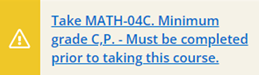
The system recommends completing a prerequisite for better understanding, but it is not mandatory for registration.

This date will show in student planning if you have a priority registration date in the upcoming term. The date and time will show in the specific term within student planning. This date will be the earliest time you can register.


This means the records are currently being accessed by the system. Wait 5-10 minutes and try again. Contact Admissions at [email protected] if you continue to experience issues.

Repeat Flag occurs if you have completed the course with a C grade or better, taken it numerous times, passed the course at another college, have a pending incomplete grade on file, or you are attempting to add multiple sections of the same course in the same term.

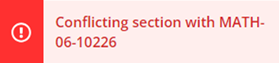
You are trying to register for two courses that overlap in time. Adjust your schedule to avoid conflicts. An Overlap Enrollment Approval form is available on our form page for minor conflicts, but you must meet with an academic advisor for guidance.
Forms – Overlap Enrollment Approval ▸

This means you are already enrolled in the section for the same term. You can drop the previous section and add a new section, but you cannot add multiple sections for the same course within the same term.

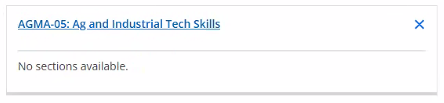
This indicates there are no sections of this course scheduled for the term you selected.
The course has reached its enrollment capacity, but you can add yourself to the waitlist. Use the Waitlist button instead of the Register button. Waitlists have a maximum of 10 student seats.


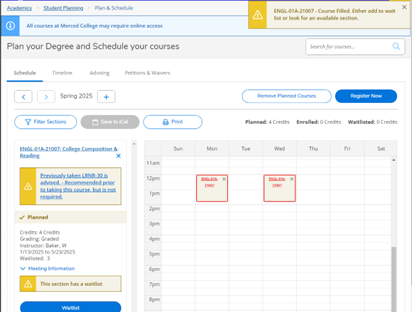
This course has reached its enrollment and waitlist capacity. Search for alternative sections.

This course has reached its enrollment and waitlist capacity. Search for alternative sections or add yourself to the waitlist.


Contact Admissions at [email protected] for information to resolve your hold.
